
WishList LMS has email parameters that let you send personalized automated messages to members and administrators. These parameters help you customize email content based on user information, membership details, and transactions.
The available parameters depend on the type of email being edited. When editing, use the Insert menu below the email to display all supported parameters for that email.
This document lists all the parameters supported by WishList LMS emails and reminders. Each parameter works only with its specific email type. You can use the links below to jump to different sections.
WishList LMS Email Parameters
These parameters apply exclusively to emails configured in Dashboard > WishList LMS > Settings > Emails tab.
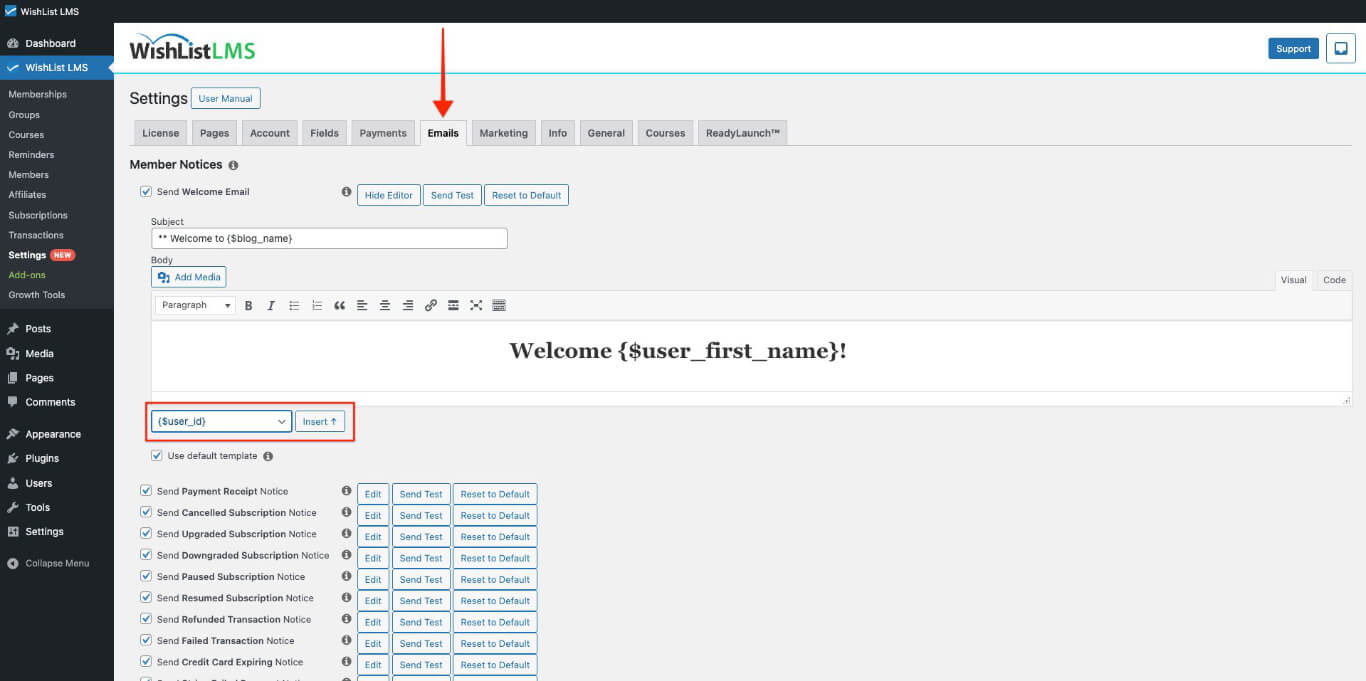
User Information Email Parameters
- {$user_id} – The user’s WordPress ID number. (For example: 9253).
- {$user_login} – The user’s registered username. (For example: johndoe)
- {1TP14Benutzername} – The user’s registered username. (For example: johndoe)
- {1TP14Benutzer_E-Mail} – The user’s email address. (For example: [email protected])
- {$user_first_name} – The user’s first name. (For example: John)
- {$user_last_name} – The user’s last name. (For example: Doe)
- {$user_full_name} – The user’s complete first and last names. (For example: John Doe)
- {$usermeta:slug} – Custom fields completed during registration. Replace “Schnecke” with your custom field identifier, such as {$usermeta:wlms_office_phone}. Review the Adding Custom Fields in Emails section for detailed information.
- {$user_address} – The user’s formatted mailing address.
- {$user_registered} – The date when the user created their account.
Membership and Product Parameters
- {$membership_type} – The purchased membership name. (For example: Bronze Membership)
- {$Produkt_name} – The purchased membership name. (For example: Bronze Membership)
- {$coupon_code} – The coupon code title if used during membership purchase
Transaction Parameters
- {$invoice_num} – The transaction database identification number; (For example: 8325)
- {$trans_num} – The transaction reference number; (For example: ch_1S7H9S70G28 or py_1S7H9S70G28)
- {$trans_date} – The transaction creation date;
- {$trans_expires_at} – The transaction expiration date;
- {$trans_gateway} – The payment gateway used for purchase; (For example: PayPal)
- {$trans_status} – The current transaction status; (For example: Complete);
- {$user_remote_addr} – The IP address from which the transaction was recorded; For example: 50.16.236.202)
- {$payment_amount} – The total transaction payment amount; (For example: $10.00)
Tax and Pricing Parameters
- {$payment_subtotal} – The pre-tax amount when taxes are enabled; (For example: $9.00)
- {$tax_rate} – The applied tax rate as a percentage; (For example: 10%)
- {$tax_amount} – The tax portion of the total sale amount; (For example: $1.00)
- {$tax_desc} – The description for the charged tax; (For example: GST)
- {$usermeta:wlms_vat_number} – The VAT number entered during registration when VAT is enabled
Business Information Parameters
This information is fetched from the Dashboard > WishList LMS > Settings > Info tab.
- {$business_name} – The business name; (For example: Robert’s Cool Tips Blog)
- {$biz_name} – The business name; (For example: Robert’s Cool Tips Blog)
- {$biz_address1} – The first address line; (For example: 123 Fake Street)
- {$biz_address2} – The second address line; (For example: Suite 321)
- {$biz_city} – The city; (For example: Tinseltown)
- {$biz_state} – The state; (For example: TX)
- {$biz_postcode} – The postal; (For example: 77777)
- {$biz_country} – The country; (For example: US)
Site and Page Parameters
- {$blog_name} – The WordPress site title; (For example: My Blog Site)
- {$account_url} – The URL to the member account page; (For example: https://yourdomain.com/account/)
- {$login_url} oder {$login_page} – The URL to the member login page; (For example: https://yourdomain.com/login/)
Subscription Parameters
- {$subscr_num} – For recurring subscriptions, displays the subscription number (For example: sub_ksdf8ksdjf8sd7s). For non-recurring subscriptions, shows the transaction number (For example: ch_1s4f1s5s1s5 or py_1s4f1s5s1s5);
- {$subscr_date} – The subscription creation or start date;
- {$subscr_gateway} – The payment gateway used for subscription purchase; (For example: PayPal)
- {$subscr_next_billing_at} – The next billing date for recurring subscriptions. Displays “Never” for non-recurring subscriptions;
- {$subscr_expires_at} – The next billing date for recurring subscriptions. For non-recurring subscriptions, shows the transaction expiration date;
- {$subscr_terms} – The subscription pricing terms; (For example: 1 Week for free then $99 / year)
- {$subscr_next_billing_amount} – The amount for the next billing cycle on recurring subscriptions;
- {$subscr_cc_num} – The last four digits of the credit card associated with recurring subscriptions. Empty for non-recurring subscriptions and PayPal payments;
- {$subscr_cc_month_exp} – The credit card expiration month;
- {$subscr_cc_year_exp} – The credit card expiration year;
Action URLs Parameters
- {$subscr_renew_url} – Links to the login page with redirect parameters for the membership renewal page after login. Use for non-recurring subscriptions with expiration dates, not for automatically renewing recurring subscriptions;
- {$subscr_update_url} – Links to the user account page where members can access the subscriptions tab and update payment information;
- {$subscr_upgrade_url} – Links to the login page with redirect parameters for the membership group page. Functions only when the membership belongs to a group with an upgrade path enabled;
- {$subaccounts_url} – The link to the Manage Sub Accounts page. Available only when the Corporate Accounts add-on is installed;
Reminder Email Parameters
These parameters apply exclusively to reminder emails configured in Dashboard > WishList LMS > Reminders.
Reminder Configuration Email Parameters
- {$reminder_id} – The unique identification number (WordPress Post ID) of the reminder. Typically not required for customer-facing reminder emails;
- {$reminder_trigger_length} – The trigger duration of the reminder. If a reminder sends 3 days after subscription expiration, this value shows 3;
- {$reminder_trigger_interval} – The trigger interval unit of the reminder. If a reminder sends 3 days after subscription expiration, this value shows “days”;
- {$reminder_trigger_timing} – The trigger timing relationship of the reminder. If a reminder sends 3 days after subscription expiration, this value shows “after”;
- {$reminder_trigger_event} – The trigger event type of the reminder. If a reminder sends 3 days after subscription expiration, this value shows “sub-expires”;
- {$reminder_name} – The reminder title or name. Example: “Subscription Expiring”;
- {$reminder_description} – The reminder description text. Example: “Subscription Expired 3 Days ago”;
Custom Fields in Reminders
- {$usermeta:slug} – Custom fields completed during registration. Replace “slug” with your custom field identifier, such as {$usermeta:wlms_office_phone}.