
Bulk Electronic Clearing System (BECS) Direct Debit is a way to pay directly from one Australian bank account to another. It is used in Australia.
The WishList LMS can accept BECS payments through Stripe. Therefore, this guide shows how to set up BECS Direct Debit and what you need to do to get started.
Prerequisites
Make sure these are ready before turning on BECS Direct Debit.
- First, connect Stripe to your website’s WishList LMS and make sure it works. Test Stripe first before setting up BECS;
- Next, complete Stripe’s identity verification for BECS Direct Debit. This step is required for bank debit payments;
- Set your currency to AUD in WishList LMS and Stripe. BECS only works with AUD;
- Finally, set both your Stripe and WishList LMS countries to Australia. This is necessary for BECS to work.
Configuring BECS Direct Debit
First, enable BECS Direct Debit in your Stripe Dashboard before activating it in WishList LMS:
- Log in to your Stripe Dashboard.
- Ir para Settings > Payment Methods.
- Locate BECS Direct Debit and click Ligar.
- Complete any verification steps Stripe requires.
Next, activate the option in WishList LMS:
Follow these steps to enable BECS as a payment method:
- Navegue até Dashboard > WishList LMS > Settings > Payments tab.
- Locate your connected Stripe gateway configuration.
- Clique no botão Customize Payment Methods botão.
- Enable the BECS option in the pop-up.
- Clique no botão Atualização button to save changes.
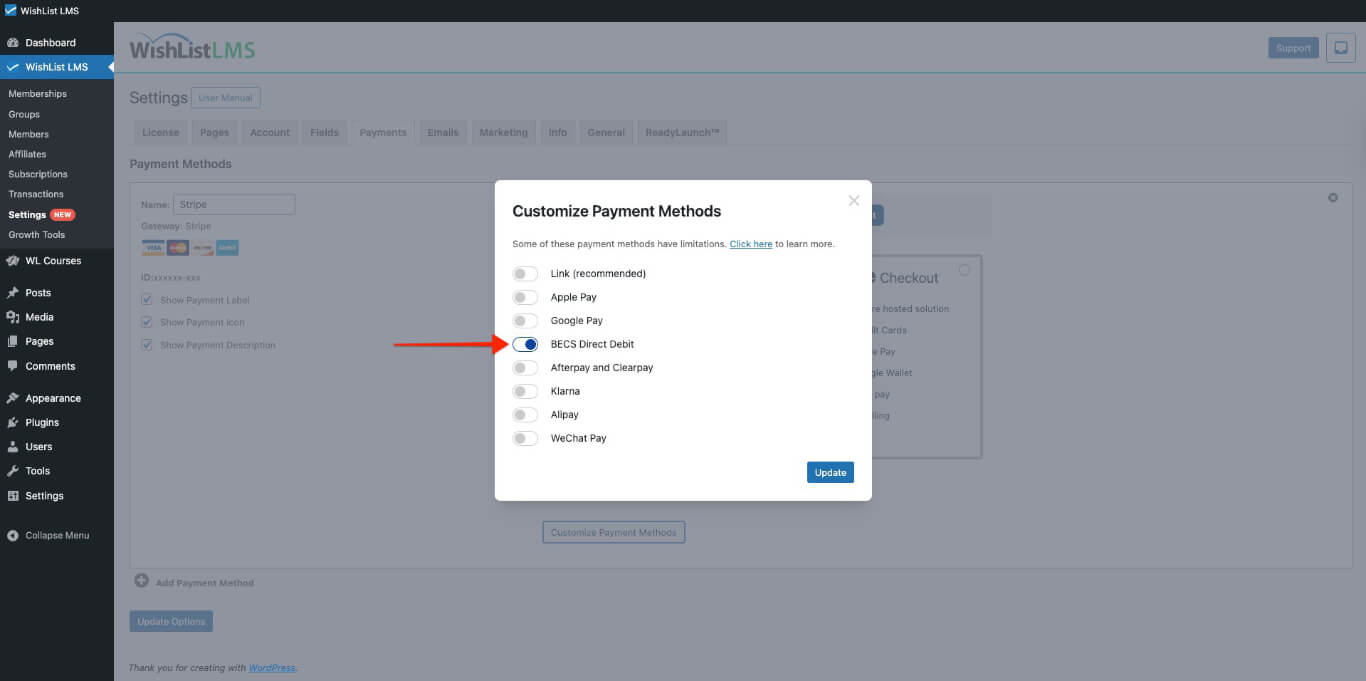
Please check more details on setting this up in the “How To Enable Payment Methods With Stripe and WishList LMS” document.
BECS Payment Process
After setting up BECS, your membership forms will show this payment option. It will appear on both Stripe Checkout e Stripe Elementos forms.
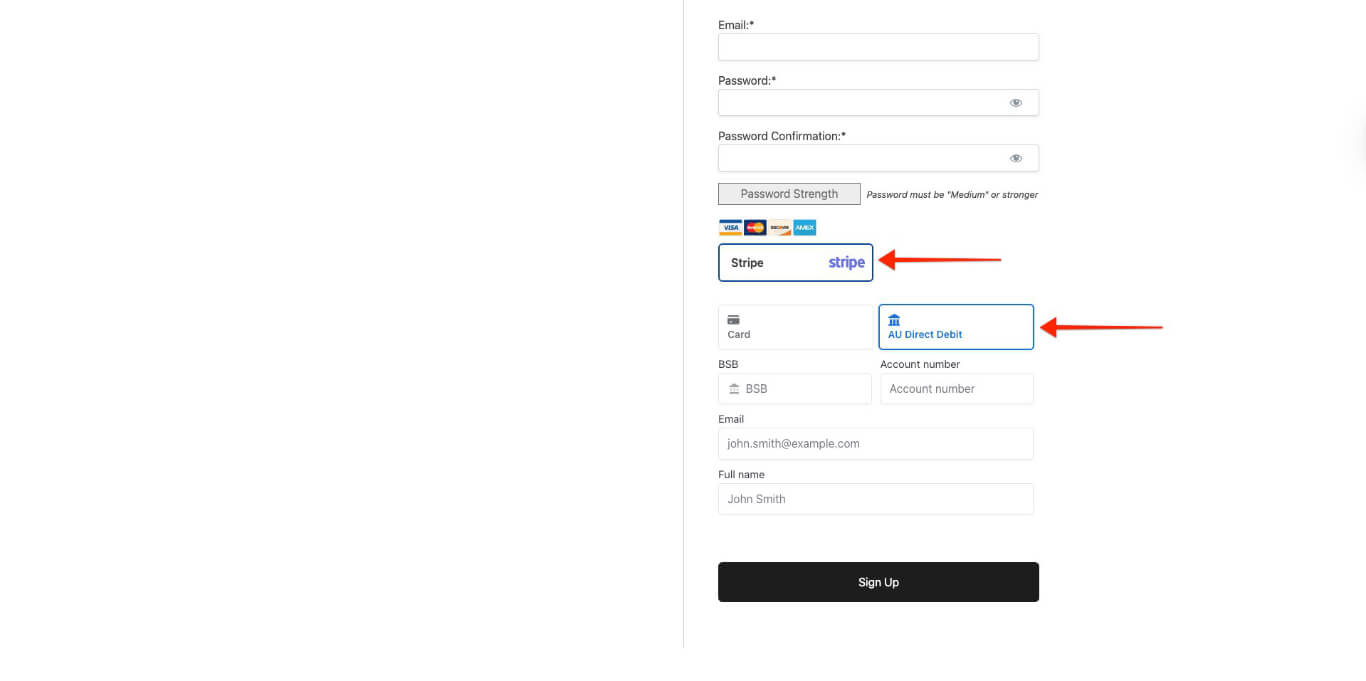
When registering, customers give their Australian bank account number, the account holder’s name, and their email. By submitting this information, they allow you to collect payments from their account for membership fees.
BECS Limitations and Requirements
BECS Direct Debit can be used for regular and one-time payments, including memberships with free or paid trials. However, there are some limits to this payment method.
Geographic and Currency Restrictions
BECS only works with Australian bank accounts and, therefore, uses Australian Dollars (AUD). Consequently, set your WishList LMS to AUD to use BECS.
Both your Stripe and WishList LMS country settings should be set to Australia for BECS to work properly.
Payment Processing Delays
BECS is a payment method that supports delay; consequently, it can take up to 3 business days to process payments and send notifications about success or failure to WishList LMS.
Grace Period Adjustment
WishList LMS usually gives a 1-day grace period for subscriptions. However, for BECS payments, it is beneficial to extend this to 5 days to handle delays and weekends. This helps avoid access problems during payment processing.
You can extend the default grace period to accommodate additional time for payment completion and confirmation.
To do this, you would need to add the following code snippet to your site:
add_filter('wlms_grace_init_days', function() {
   return 5;
});
This code sets a 5-day grace period; however, you can change the number of days by editing the line below.
return 5;
If you use the mentioned payment methods for your renewals, the same issue might happen; therefore, you need to add a second code snippet to extend the grace period on renewals.
add_filter('wlms_grace_expire_days',  function($days) {
   return 5;
});
Change the grace period duration for this code, as you did before for the first code.
After updating the grace period in both code snippets, you should then add them to your website’s functions.php file or, alternatively, use the WPCode plugin.