
WishList LMS works with Stripe, so customers in the US can pay directly from their bank accounts using ACH Direct Debit—no credit card needed.
This document explains how to set up ACH payments with Stripe in WishList LMS. It covers what you need and the important points to remember.
What Is ACH Direct Debit
ACH Direct Debit is a way to pay electronically by moving money directly between US bank accounts. It works only in the United States and uses US Dollars.
ACH payments usually take 1-4 days to finish because they go through a batch process in the Automated Clearing House network, not instantly.
Prerequisites
Make sure these things are ready before you enable ACH payments.
- Your WishList LMS site needs an SSL certificate to ensure secure payments;
- Connect your Stripe account to WishList LMS and make sure it works. Test it before turning on ACH payments.
- Set your WishList LMS currency to USD because ACH only works with US Dollars;
- Set your Stripe account location to the United States;
- Make sure your WishList LMS site is set to the United States in the plugin.
Enabling ACH in Your Stripe Dashboard
Before activating ACH in WishList LMS, enable the payment method in your Stripe Dashboard:
- Log in to your Stripe Dashboard.
- Ir para Settings > Payment Methods.
- Under Bank debits, locate ACH Direct Debit and click Ligar.
- Complete any verification steps Stripe requires.
Configuring ACH in WishList LMS
You can activate ACH in WishList LMS settings by following the steps below:
- Navegue até Painel de controle > WishList LMS > Configurações.
- Clique no botão Payments tab.
- Locate your configured Stripe gateway.
- Clique no botão Customize Payment Methods botão.
- Enable ACH Direct Debit in the payment method options.
- Clique no botão Atualização button in the pop-up to apply the configuration.
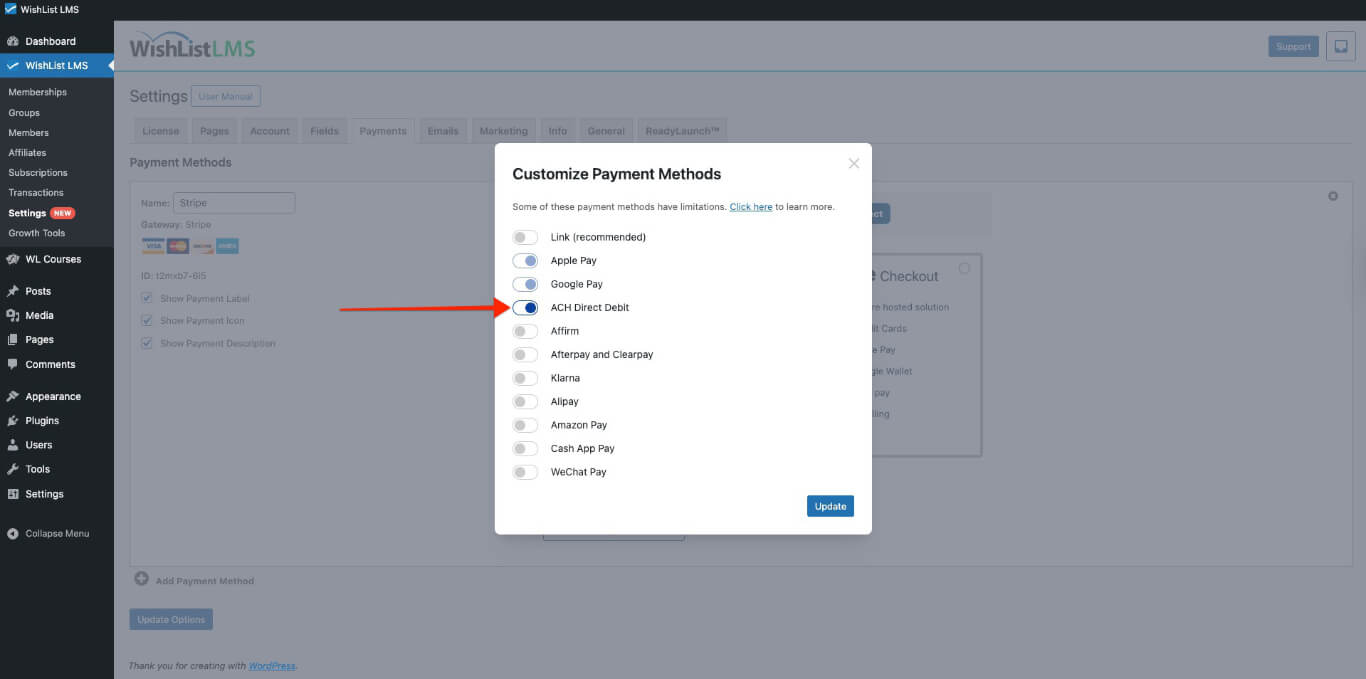
For additional Stripe payment method configurations, reference the Stripe payment methods documentation.
How ACH Payments Work
After setup, ACH Direct Debit shows up as a payment option on registration forms. It appears automatically on both Stripe Checkout e Stripe Elementos forms.
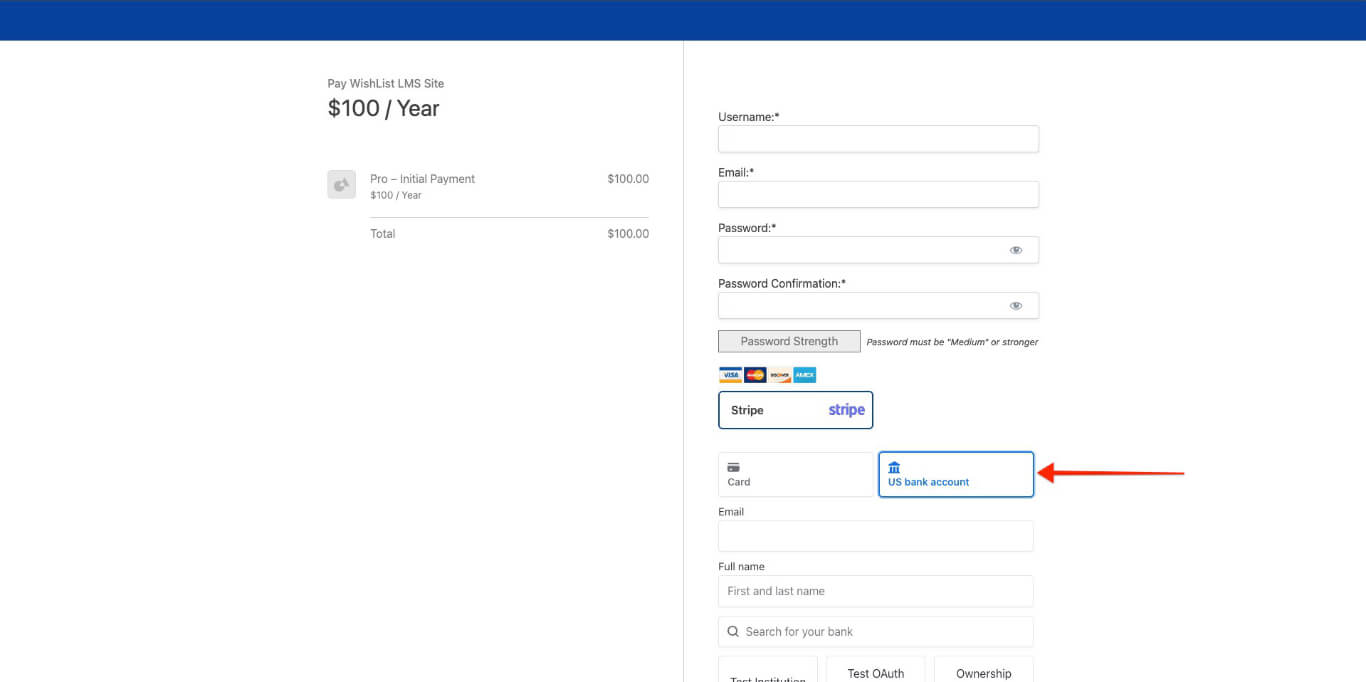
Customers selecting ACH must complete the following steps:
- Enter their name and email.
- Connect their bank account through secure bank login verification.
- Share bank and account details.
- Set up automatic payments from their bank account.
- Send the form to finish the process.
ACH Payment Processing
ACH Direct Debit lets you make one-time payments or set up recurring subscriptions. It also works with memberships that have free trials or paid trial periods.
Processing Timeline
ACH payments take 1-4 business days to process. WishList LMS gets updates after Stripe handles the transfer.
Because of processing delays, extend the grace period in WishList LMS to 6 days. This keeps members from losing access during the ACH payment process.
To do this, you would need to add the following code snippet to your site:
add_filter('wlms_grace_init_days', function() {
	return 6;
});
This code sets a 6-day grace period. You can change the number of days by editing the line below.
return 6;
If you use the mentioned payment methods for your renewals, the same issue might happen. You need to add a second code snippet to extend the grace period on renewals:
add_filter('wlms_grace_expire_days',  function($days) {
     return 1;
});
Change the grace period duration for this code, like you did before for the first code.
After updating the grace period in both code snippets, add them to your website’s functions.php file or use the WPCode plugin.
Payment Restrictions
ACH Direct Debit has specific limitations based on banking regulations:
- Only for US bank customers;
- Handles payments only in the US;
- Needs a Stripe account in the US and WishList LMS;
- Subject to ACH network processing times and bank schedules.
Managing ACH Subscriptions
Managing subscriptions with ACH payments is straightforward. If a customer pauses or cancels, any payments already sent through ACH will still be processed.
Payments after subscription changes won’t be automatic. This helps avoid extra charges and follows ACH rules.
Troubleshooting ACH Issues
Common ACH problems are wrong currency settings and incomplete Stripe setup. Make sure both WishList LMS and Stripe are set up for the US before testing payments.
Make sure ACH options show to customers by checking that the payment method is turned on in both systems. Also, ensure the customer locations and currencies meet ACH rules for payments to go through. For help with ACH payments, check the Stripe ACH Direct Debit guide.