
EPS is an Austrian payment system that lets customers pay online using their bank login. Additionally, it provides a secure and convenient way for users to complete transactions without needing to enter credit card information.
The WishList LMS works with Stripe to accept EPS payments. This guide explains how to set it up and provides important tips.
Prerequisites
Make sure the following are ready before setting up EPS payments.
- First, Connect Stripe to your website’s WishList LMS, and then test it to make sure it works;
- Defina o currency to EUR in WishList LMS settings;
- Make sure your Stripe account is in a country that supports EPS payments; therefore, you can effectively process transactions.
Accepting Payments With EPS
WishList LMS only accepts EPS payments via Stripe.
To enable EPS for your WishList LMS registration forms, first enable EPS in your Stripe Dashboard:
- Log in to your Stripe Dashboard.
- Ir para Settings > Payment Methods.
- Locate EPS and click Ligar.
- Complete any verification steps Stripe requires.
Next, activate the option in WishList LMS by following these steps:
- Navegue até Dashboard > WishList LMS > Settings > Payments tab.
- Locate your connected Stripe gateway.
- Clique no botão Customize Payment Methods botão.
- Toggle on the EPS option.
- Clique no botão Atualização button in the pop-up to save the settings.
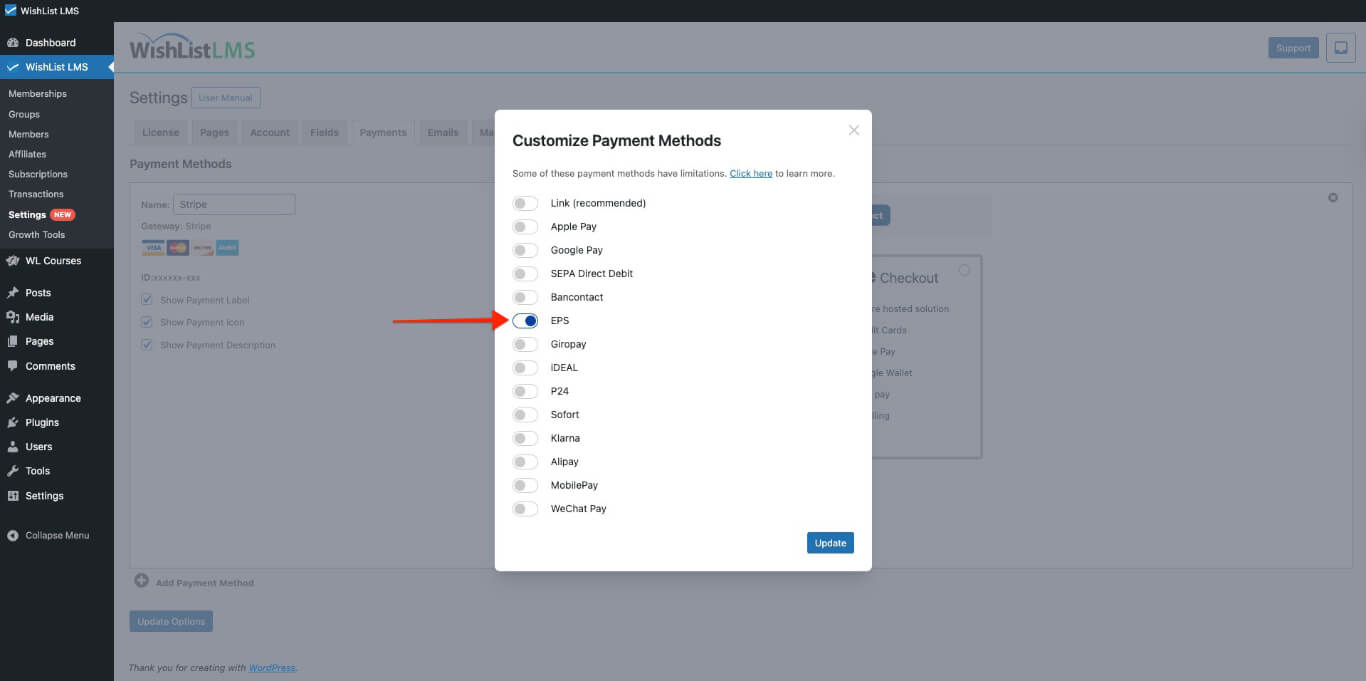
Please check more details on setting this up in the “How To Enable Payment Methods With Stripe and WishList LMS” document.
After EPS activation, the payment option will appear on the registration forms. It will be available on both Stripe Checkout e Stripe Element forms.
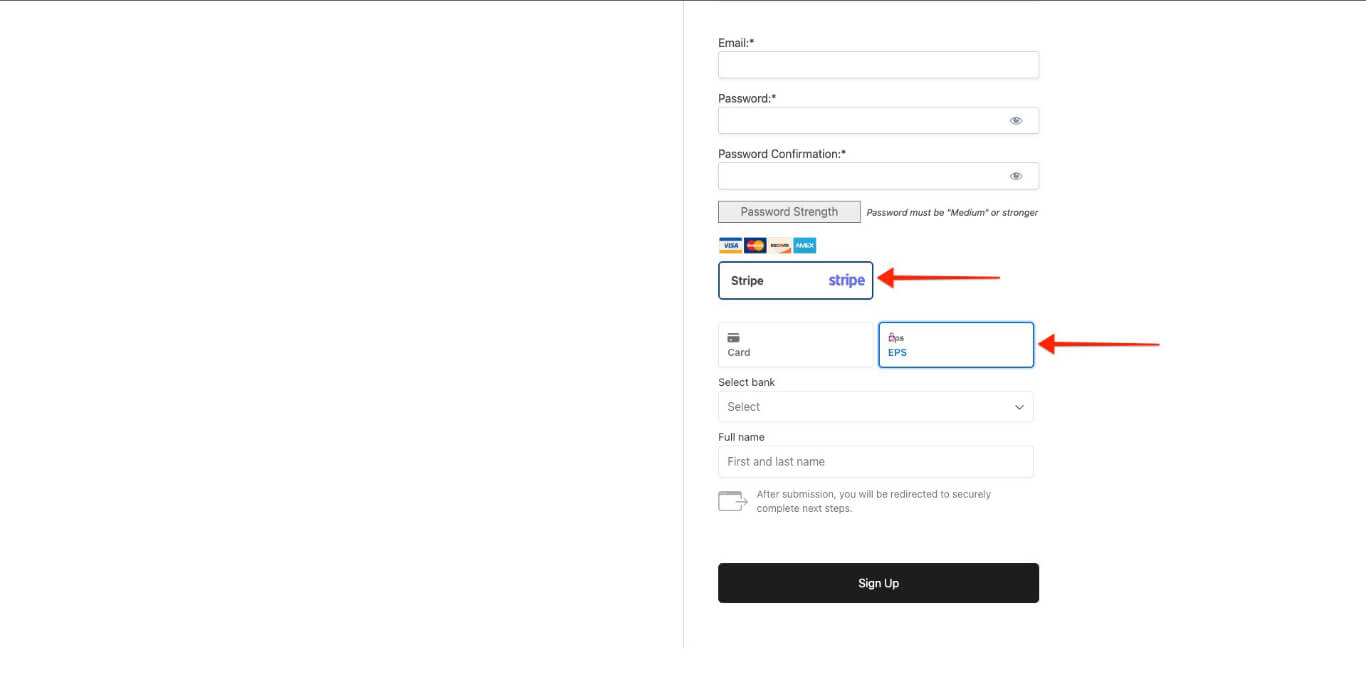
When users fill out the registration form, they are redirected to their Austrian bank’s website to pay. After the payment is confirmed, they are automatically sent back to your website.
Essential Information for Utilizing EPS
The system only offers the EPS payment option when users meet certain conditions. EPS or Stripe also sets restrictions for the integration.
Initially, understand that EPS functions solely for non-recurring payments. Consequently, this payment method remains hidden on registration pages for recurring membership subscriptions.
Additionally, EPS doesn’t support deferred payments, so it’s not available for memberships that include free or trial periods.
Supported Countries and Currencies
Here’s a simple guide to supported countries and currencies for EPS, along with key settings for WishList LMS. Additionally, this will help you navigate the features effectively.
- EPS works only in certain areas and currencies;
- Defina o currency to EUR in WishList LMS settings for EPS;
- Furthermore, Only users with Austrian bank accounts can access EPS.
To accept EPS payments, you must set up your Stripe account in one of these countries:
Australia, Austria, Belgium, Bulgaria, Canada, Croatia, Cyprus, Czech Republic, Denmark, Estonia, Finland, France, Germany, Gibraltar, Greece, Hong Kong, Hungary, Ireland, Italy, Japan, Latvia, Liechtenstein, Lithuania, Luxembourg, Malta, Mexico, Netherlands, New Zealand, Norway, Poland, Portugal, Romania, Singapore, Slovakia, Slovenia, Spain, Sweden, Switzerland, United Kingdom, or the United States.
For more details, see Stripe’s EPS payments guide.