
BACS Direct Debit is a payment method in the UK that allows direct money transfers between bank accounts.
WishList LMS works with Stripe to accept BACS payments. This guide explains how to set it up and provides key details about BACS Direct Debit.
Voraussetzungen
Make sure these things are ready before setting up BACS Direct Debit payments.
- Your website needs an active SSL certificate for secure payments. You also need a verified Stripe account with bank details connected. New Stripe accounts might take a few days to verify;
- Your Stripe account country must be the United Kingdom;
- Your WishList LMS country setting must be set to the United Kingdom. Navigate to Dashboard > WishList LMS > Settings > Infos to adjust this;
- Currency in WishList LMS settings must be GBP from Dashboard > WishList LMS > Settings > Allgemein;
- Finally, connect Stripe to WishList LMS and verify it works. Then, you can turn on BACS payments.
Enabling BACS in Your Stripe Dashboard
Before activating BACS in WishList LMS, enable the payment method in your Stripe Dashboard:
- Log in to your Stripe Dashboard.
- Gehe zu Settings > Payment Methods.
- Under Bank debits, locate BACS Direct Debit and click Einschalten.
- Complete the Stripe identity verification process, which may take several business days.
Setting Up BACS Direct Debit
Follow these steps to enable BACS Direct Debit payments:
- Gehe zu Dashboard > WishList LMS > Settings > Payments tab.
- Locate your connected Stripe gateway.
- Klicken Sie auf die Customize Payment Methods Taste.
- Aktivieren Sie die BACS option in the additional payment methods section.
- Klicken Sie auf die Update button in the pop-up to save changes.
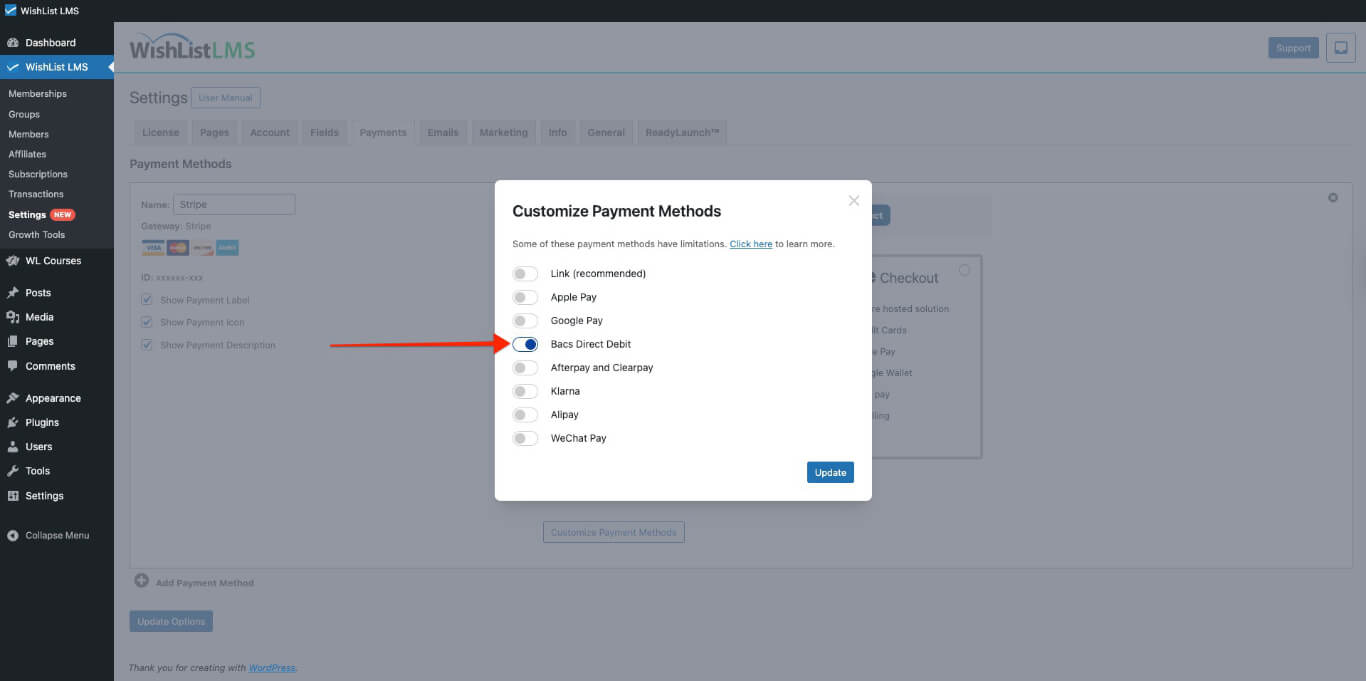
For more details on setting this up, see the How To Enable Payment Methods With Stripe and WishList LMS document.
Customer Payment Process
Once BACS is enabled, you can see this payment option on your registration forms. It appears on both Stripe Checkout and Stripe Element forms.
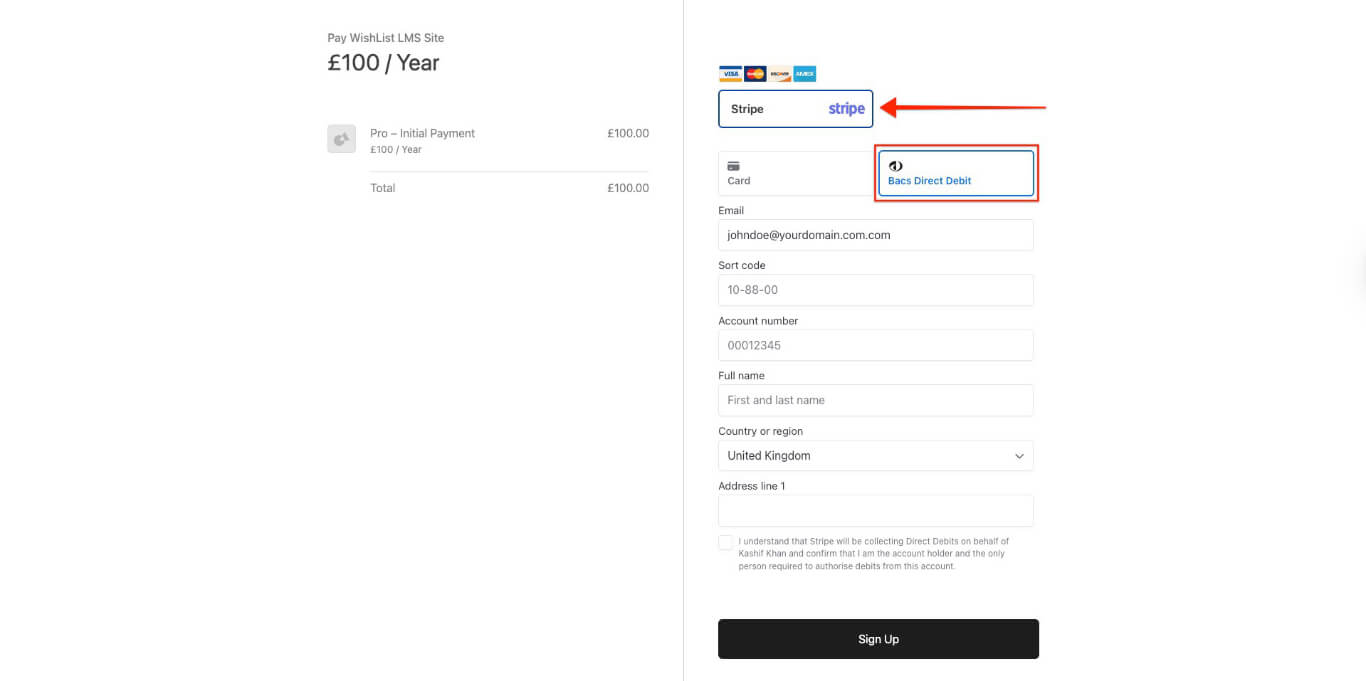
Customers need to give some information when signing up, such as:
- Sort code;
- Account number;
- Full name;
- Email address;
- Complete address.
When customers send their payment details, they give permission for your company to take money from their account using a Direct Debit mandate.
Important Limitations and Requirements
The BACS payment option only shows up when certain conditions are met. There are some limitations from BACS or Stripe.
Payment Types and Restrictions: BACS Direct Debit is a way to pay for both regular and one-time payments. It allows delayed payments but not free ones, so it can’t be used for free trial memberships.
Geographic and Currency Requirements: BACS is only for UK bank accounts and only works with Pounds Sterling (GBP).
Processing Timeline and Grace Periods: BACS is a payment method that takes up to 6 business days to process and notify WishList LMS if the payment was successful or not.
WishList LMS sets a 1-day grace period for subscriptions. For BACS payments, increase it to 8 days or more, so users don’t lose access while paying.
To do this, you would need to add the following code snippet to your site:
add_filter('wlms_grace_init_days', function() {
   return 14;
});
This code sets a 14-day grace period. You can change the number of days by editing the line below.
return 14;
If you use the mentioned payment methods for your renewals, the same issue might happen. You need to add a second code snippet to extend the grace period on renewals:
add_filter('wlms_grace_expire_days',  function($days) {
   return 1;
});
Change the grace period duration for this code, as you did before for the first code.
After updating the grace period in both code snippets, you should then add them to your website’s functions.php file or, alternatively, use the WPCode plugin.
For additional technical details, consult the Stripe BACS Direct Debit documentation.